Picking a Printing Machine? It's rarely just a simple purchase. You need the right model to fit your materials, your workload, your budget, and what you actually want to produce. And here's the thing: a machine that looks great in a showroom can feel totally different next to a busy workshop. That difference really matters.
So, this guide gives you ten practical tips to help you make a smarter decision. We'll look at print speed, resolution, media compatibility, automation, maintenance, energy use, safety, and total cost of ownership. Honestly, those details often tell you more than the advertised output ever will. A careful buyer should check sample prints, go through the specs, and ask how fast service responds. Also, talk to operators who run similar equipment every day. They'll usually point out the little annoyances—awkward loading, noisy operation, frequent cleaning—stuff brochures never mention.
Specs can mislead, though. Not because they're useless, but because they need context. Rated speed might change depending on paper weight, ink coverage, or finishing needs. So test your actual files before you sign anything. And one test isn't enough. Try several media types and some demanding designs. Keep written notes on results, warranty terms, training, spare parts, and upgrade options.
No checklist can remove every risk. Even experienced teams can miss workflow changes or future demand. Might as well admit it. A reliable choice balances what you need now with realistic growth—not just chasing the fastest or cheapest option. With evidence, good specialist advice, and an honest look at your daily operations, your next Printing Machine can become a dependable production tool instead of an expensive experiment.
Define Your Printing Goals and Expected Workload
Choosing the right printing machine begins with a clear definition of your printing goals. Are you producing product labels, office documents, packaging samples, or large promotional graphics? Each task demands different paper sizes, finishes, speeds, and color controls. I have seen teams overbuy equipment because “more capacity” sounded safer. It often created unused features, higher maintenance, and operator confusion. Measure your weekly output, peak-day volume, and acceptable turnaround time before comparing specifications.
Tips: Record three months of real print data, not guesses. Separate routine jobs from occasional projects. Note the media you actually use, including coated sheets, envelopes, thick stock, or adhesive materials. A machine that handles your daily work smoothly may be better than a faster model that struggles with common materials. Test samples when possible. Small details matter.
Your expected workload should include tomorrow’s realistic growth, but not an imaginary expansion plan. Calculate average pages per day and identify busy periods. Then examine duty cycles, warm-up time, feeding reliability, and maintenance access. A machine may promise impressive speed, yet frequent cleaning can reduce practical output. Ask operators what slows current production. Their answers may challenge your spreadsheet. Also, leave room for mistakes, reprints, and urgent jobs. A perfect forecast rarely exists, and mine has been wrong before.
Compare Printer Types, Technologies, and Suitable Applications
10 Tips for Choosing the Right Printing Machine
Choosing a printing machine starts with the job, not the advertised speed. In a small packaging workshop, I compare material, color volume, finish, and daily output before discussing price. An inkjet system suits variable graphics and short runs. A laser printer handles crisp office documents and quick text production. For fabric, a textile printer may offer better ink absorption and softer results. Screen printing remains useful for repeat designs on shirts, boards, and other flat materials. Each type has limits. A fast machine can waste time when setup, drying, or cleaning is slow.
Technology changes application fit. An Uv Printing Machine cures ink with ultraviolet light, allowing direct printing on coated boards, acrylic, wood, and some rigid plastics. Surface testing still matters. Heat-sensitive media may need careful settings. Solvent-based systems often suit outdoor graphics, but ventilation and maintenance requirements are higher. Water-based equipment can produce detailed indoor prints, especially on treated paper or fabric. I check resolution, color management, printhead maintenance, and ink compatibility during trials. Small samples reveal banding, edge spread, and adhesion problems better than brochures.
Application should shape the purchase. A sign shop needs width, weather resistance, and reliable unattended operation. A school may value low noise, simple software, and safe consumables. A commercial printer may prioritize duty cycle, automation, and service access. Measure the doorway, power supply, floor space, and operator skill. These details are easy to overlook. I once focused on maximum resolution and underestimated drying time. The machine produced beautiful samples, but missed the delivery schedule. That mistake still influences my evaluations. Ask for a live demonstration using your own media, not a perfect showroom sheet. Costs include ink, waste, cleaning, replacement parts, training, and downtime. The cheapest purchase can become the most expensive decision.
Evaluate Print Quality, Speed, and Supported Materials
A practical printing machine evaluation begins with print quality, not a flashy speed figure. Request sample prints using your actual artwork, text sizes, and color requirements. Inspect fine lines, small lettering, gradients, and solid areas under bright light. Look for banding, blurred edges, uneven density, or color shifts between copies. A clean first sample proves little. Run a longer batch and check whether quality remains stable.
Speed should be measured during sustained production, not only at the advertised maximum.
Record setup time, warm-up time, material changes, and routine cleaning. A machine producing 100 pages per minute may slow significantly with detailed graphics or heavier media. Calculate finished output per hour. That figure is more useful. Also, check whether operators can adjust settings without creating avoidable delays.
Supported materials require close attention.
Confirm thickness limits, surface coatings, sheet sizes, roll widths, and drying requirements. Test ordinary stock, textured paper, labels, or synthetic media if your work depends on them. Material compatibility can affect feeding, adhesion, curing, and final color. Ask for written specifications and test results. Do not rely on verbal promises alone. One mistake I still see is choosing flexibility over consistency. A machine may accept many materials, yet perform well on only a few. Leave room for honest compromises, especially when maintenance skills and workspace conditions are limited.
Calculate Purchase, Operating, and Maintenance Costs
When choosing a Dtf Printing Machine, the purchase price is only the visible number. Request a detailed quotation covering delivery, installation, software, training, and taxes. I have seen low-cost equipment become expensive after adding missing accessories. A stable worktable, ventilation, and heat equipment may also require extra budget.
Calculate the operating cost for one finished print. Include film, powder, ink, electricity, labor, packaging, and failed transfers. A simple spreadsheet helps. Record actual consumption for one week instead of trusting estimates. For example, ten test prints may reveal uneven powder use or frequent cleaning. Small losses become serious at higher production volumes. Do not ignore staff time.
Maintenance costs need their own line. Check cleaning supplies, filters, replacement parts, and possible printhead service. Ask how often routine cleaning is required and how long common repairs usually take. Keep a monthly maintenance log with dates, costs, and downtime. This creates useful evidence for future purchasing decisions. My early estimates were too optimistic because I forgot production delays. That mistake still matters. Before approval, compare the machine’s yearly operating cost with realistic output, not its maximum advertised speed.
Check Size, Connectivity, Software, and Ease of Use
10 Tips for Choosing the Right Printing Machine
Choosing a printing machine starts with the material you actually handle. Measure the widest tag, label, or card you print, including its margin. Tip 1: Match the machine’s maximum media width to your largest job. Tip 2: Check resolution and print speed together, not separately. A fast machine may produce softer small text. Tip 3: Inspect the roll core size and loading path. Awkward loading wastes time every morning. I once underestimated this detail, and the machine became frustrating during busy orders.
Connectivity affects daily reliability. Tip 4: Choose USB for simple, nearby use, or Ethernet for shared office access. Tip 5: Consider wireless connectivity only after checking signal strength near the workstation. Tip 6: Confirm compatibility with your computers and network security settings. A stable connection matters more than a long feature list. Keep this practical. You may not need every option.
Software can determine whether a Tag Printing Machine feels professional. Tip 7: Look for editable templates, barcode support, and clear preview tools. Tip 8: Confirm that common file formats import without repeated adjustments. Tip 9: Test whether multiple users can create consistent layouts. Ease of use deserves a hands-on check. Load a sample roll, adjust the media guides, and print a small batch. Tip 10: Ask how quickly a new operator can learn the controls. I still overestimate training speed sometimes, so observe a real user before deciding.
10 Tips for Choosing the Right Printing Machine
Start with the formats and workflows your organization actually uses. The chart compares standard paper dimensions in millimetres; confirm that the machine supports your required media size, weight, and paper path.
- Check supported paper sizes, including A4, A3, Letter, Legal, and custom formats.
- Confirm the supported paper weight and media types, such as envelopes, labels, and cardstock.
- Match the rated print speed to your expected monthly page volume.
- Choose the required print quality and resolution for text, graphics, or photographs.
- Check connectivity options, including USB, Ethernet, and Wi-Fi.
- Verify compatibility with your operating systems and existing network environment.
- Review software support for drivers, mobile printing, scanning, and workflow automation.
- Consider automatic duplex printing and document-feeding capabilities.
- Evaluate the control panel, setup process, accessibility, and overall ease of use.
- Compare consumable availability, maintenance requirements, energy use, and total cost of ownership.
Review Reliability, Safety Features, Warranty, and Support
Choosing a Dtg Printing Machine requires more than comparing speed, resolution, and purchase price. In my testing experience, reliability appears in small moments: a clean startup, stable ink flow, and consistent platen movement after several hours. Ask the supplier for duty-cycle data, maintenance records, and sample prints from demanding fabrics. Request a live demonstration. Watch the first and fiftieth shirt, not just the perfect sample.
Safety features deserve equal attention. Check enclosed moving parts, emergency stops, ventilation guidance, spill control, and clear electrical instructions. A machine should pause safely when a cover opens. Operators also need training for ink handling, cleaning fluids, heat, and waste disposal. I have seen manuals that looked complete but skipped ordinary problems, such as a blocked nozzle or a loose cable. That gap matters. Maybe my assessment was too harsh, but unclear instructions create avoidable risk.
Read warranty terms line by line. Confirm coverage for printheads, pumps, software, and labor, including exclusions caused by routine maintenance. Ask how quickly support replies and whether technicians can diagnose faults remotely. Reliable support means practical answers, stocked replacement parts, and documented repair steps. Test the service before buying with three specific questions. Keep every response. A long warranty is not automatically useful. If downtime costs a full production day, a vague promise may be cheaper only on paper.
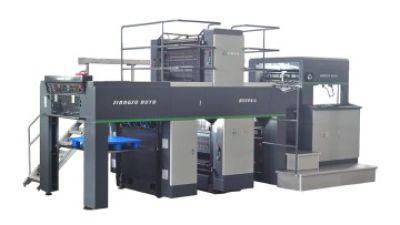
RYS92G Double-Sided Monochrome Offset Printing Press: Features, Benefits, and Applications
The RYS92G double-sided monochrome offset printing press is designed for professional operations that require consistent quality and dependable output. Its double-sided printing capability allows both sides of a sheet to be printed efficiently, reducing handling time and supporting smoother production workflows. As a monochrome offset press, it delivers sharp text, clean lines, and stable image reproduction, making it suitable for documents where clarity and uniformity are essential. The press is also built to accommodate a wide range of paper sizes and thicknesses, giving operators greater flexibility when managing different orders.
With its reliable performance and adaptable paper handling, the RYS92G can serve commercial printers, corporate print departments, educational institutions, and publishing facilities. It is well suited for business forms, manuals, training materials, reports, book interiors, flyers, and other high-volume black-and-white applications. The combination of two-sided printing, broad media compatibility, and efficient offset production can help reduce repetitive setup work while maintaining consistent results across longer print runs. Its professional design supports demanding daily workloads and allows printing businesses to respond to varied customer requirements without relying on multiple specialized machines.
FAQS
Start with the job, not the advertised speed. Check materials, color volume, finish, and daily output. A fast machine may still lose time during setup or drying.
An inkjet system usually fits variable graphics and short production runs. It can handle frequent design changes without making large screens or plates. Test color consistency on your actual material.
Laser printers suit crisp office documents and quick text production. They are useful when sharp lines matter more than fabric softness or rigid-surface adhesion. They may not fit every specialty material.
Ultraviolet-curing systems can print directly on coated boards, acrylic, wood, and some rigid plastics. Test the surface before production. Heat-sensitive media may require careful settings.
Yes, especially for repeat designs on shirts, boards, and other flat materials. It can be effective for consistent artwork. Setup time may make it less suitable for small, changing orders.
Request a live demonstration using your own media. Inspect the first print and the fiftieth print. Look for banding, edge spread, drying problems, and weak adhesion. Small samples matter.
Include ink, waste, cleaning, replacement parts, training, and downtime. A low purchase price can hide expensive maintenance. I once valued maximum resolution too highly and underestimated drying time.
Check enclosed moving parts, emergency stops, ventilation guidance, spill control, and electrical instructions. Operators need training for ink, cleaning fluids, heat, and waste disposal. Clear manuals matter.
Ask for duty-cycle data, maintenance records, and demanding sample prints. Confirm coverage for printheads, pumps, software, and labor. Check exclusions carefully. A long warranty may still provide weak support.
Measure the doorway, floor space, and available power supply. Consider noise, operator skill, software, and service access. These details seem minor. They can delay installation.
Conclusion
Choosing the right Printing Machine starts with clearly defining your printing goals, expected monthly workload, and the types of projects you plan to produce. Consider whether you need a solution for documents, images, labels, packaging, or specialized materials, then compare suitable printer types and technologies. Pay close attention to print quality, production speed, color consistency, paper size, and compatibility with different media.
A complete evaluation should include more than the initial purchase price. Calculate ongoing expenses such as ink or toner, replacement parts, energy use, and routine maintenance. Also check the machine’s physical size, connectivity options, software compatibility, controls, and ease of operation. Reliable performance, built-in safety features, warranty coverage, and responsive technical support can reduce downtime and improve long-term value. By balancing performance, flexibility, total ownership cost, and service quality, you can select a Printing Machine that matches both your current requirements and future growth.